• Skip to content
  • Skip to primary sidebar

Right Attitudes

Ideas for Impact

Effective Communication

Personal Spaces for Social Interaction

April 3, 2007 By Nagesh Belludi 1 Comment

Personal Spaces for Social Interaction

We regard the physical space around our bodies as personal territories. Subconsciously, we consider ourselves the center of a series of invisible bubbles—each bubble representing a comfort zone. American anthropologist Edward Hall defined four personal spaces in his classic book ‘The Hidden Dimension‘ (1966.)

  1. Intimate space for interacting with significant people and for hand-shaking, whispering, etc. with friends and acquaintances—touch to 1.5 feet away
  2. Casual space for interacting with close friends—1.5 feet to 4 feet away
  3. Social space for interacting with acquaintances—4 feet to 12 feet away
  4. Public space for interacting with relatively anonymous people—further than 12 feet away

Personal Spaces Represent Comfort Zones

Personal Spaces Represent Comfort Zones The distances associated with the comfort zones above depend on one’s cultural upbringing. During an interaction, the nature of the interpersonal relationships and/or the context of interaction may affect comfort zones too. Consequently,

  • Personal spaces are larger for two strangers in a conversation.
  • Women tend to have smaller personal spaces when interacting with other women.
  • Westerners tend to require larger personal spaces. People from India, China and other Asian cultures are used to crowded cities, packed public busses, and such—hence, they are more comfortable standing close to other people.
  • Two individuals in an argument expect each other to be as far as possible. If one of them moves closer, the other person may interpret this move as a sign of aggression.

Significance of Personal Spaces

The significance of this concept of personal space is obvious: we feel uncomfortable if a person enters a space that we do not desire him/her to be in.

  • During hand-shaking, do not get too close to the other person. Being within the other person’s arm-length ensures you are within his/her personal zone, and out of the intimate zone.
  • Stay within the friendly zone if you want a casual conversation with a celebrity.
  • When talking to or walking with somebody else, if the other person backs away a little, it is likely that you are encroaching his/her comfort zone. Be mindful of the other person’s requirements—do not try to close the gap.
Wondering what to read next?

  1. How to Make Eye Contact [Body Language]
  2. Unreliable Narrators Make a Story Sounds Too Neat
  3. Want to be more likeable? Improve your customer service? Adopt Sam Walton’s “Ten-Foot Rule”
  4. How to Reliably Tell If Someone is Lying
  5. How to … Discreetly Alert Someone to Embarrassing Situations

Filed Under: Effective Communication, Sharpening Your Skills Tagged With: Body Language, Etiquette

Presentation Skills #4: On Handouts

March 22, 2007 By Nagesh Belludi 1 Comment

Handouts or takeaways can enhance the core content of a presentation or speech and serve as sources of information for reference and recall. Here are a few guidelines to consider for distributing handouts.

  • As a general guideline, do not distribute handouts prior to a presentation if the audience is likely to become absorbed in the handouts and ignore your verbal presentation. For instance, if you are training college students on interviewing skills, consider distributing your handouts after the seminar.
  • When the audience is likely to be more serious or needs to study charts or illustrations to participate meaningfully, do distribute your handouts before commencing your presentation. Your audience can follow along your verbal presentation and make notes on the handouts.

Handouts for Pre-reading

Quite often, handouts may also serve as pre-reading material to help the audience study the content beforehand and prepare for your presentation. Suppose that you will lead a presentation for approval of a new steering wheel design. If you distribute a PowerPoint file with illustrations and key features of your new design, the electronics, dashboard, manufacturing and assembly teams can review your design ahead of time. This facilitates brainstorming and informed decision-making during the design approval presentation.

Survey your Audience

Survey the audience prior to your presentation. Depending on the nature of your audience and the purpose of your interaction, distribute handouts when appropriate.

Wondering what to read next?

  1. Unlock the Power of Communication: Start with the End in Mind!
  2. An Essential Secret of Great Speakers: Pauses in Talking
  3. Never Give a Boring Presentation Again
  4. Why They Don’t Understand You and What to Do About It
  5. Jargon Has Its Place in Business Communication

Filed Under: Effective Communication Tagged With: Meetings, Networking, Presentations

Presentation Tips #3: Compressing Photos in PowerPoint

February 21, 2007 By Nagesh Belludi Leave a Comment

Suppose you are preparing a PowerPoint presentation with pictures from prototype testing of a design or pictures from your vacation. When you insert pictures into the PowerPoint file, you may realize that the file’s size will balloon with addition of each picture. You may end-up with a large PowerPoint file that may perhaps be difficult to distribute or email.

The reason for larger PowerPoint files is twofold. Firstly, Microsoft PowerPoint may not store picture data in an optimum format. Secondly, while today’s digital cameras can capture pictures at high resolutions (between three to five megapixels per picture,) on-screen display requires pictures of just 96 DPI (dots per inch) resolutions. In addition, typical office-document printing requires pictures of no more than 200 to 300 DPI resolutions.

The more-recent versions of Microsoft PowerPoint facilitate compressing pictures easily to create smaller files.

Compressing Photos in PowerPoint

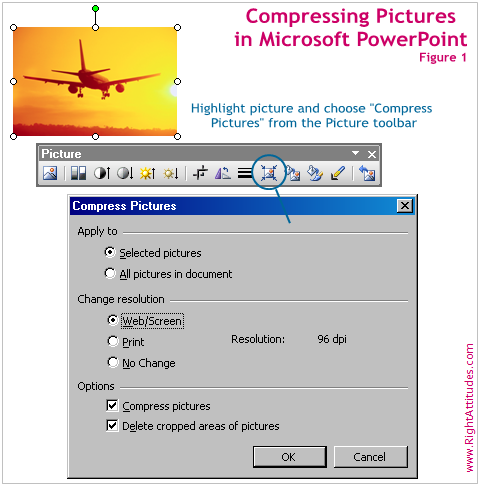
If you desire to compress a single picture or a group of pictures, highlight the pictures. The Picture toolbar will appear, as illustrated in Figure 1. Now, choose “Compress Pictures” from the Picture toolbar. In the resulting dialogue box, make appropriate selections to execute the command.

Compressing Photos in PowerPoint

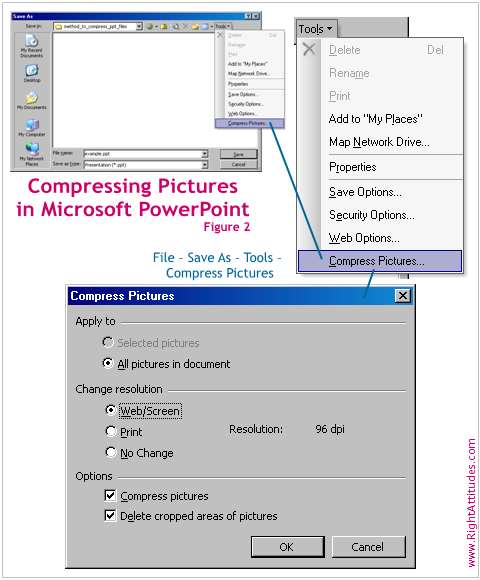
If you desire to compress all the pictures in your PowerPoint file, an easier approach involves the “Save As” dialogue. From the menu bar, choose “File” – “Save As … .” In the resulting dialogue box, open the “Tools” dropdown and choose the “Compress Pictures” command, as illustrated in Figure 2.

Wondering what to read next?

  1. Albert Mehrabian’s 7-38-55 Rule of Personal Communication
  2. The More You Write, The Better You Become
  3. Serve the ‘Lazy Grapefruit’
  4. Presentations are Corrupting per Edward Tufte’s “The Cognitive Style of PowerPoint”
  5. Jargon Has Its Place in Business Communication

Filed Under: Effective Communication Tagged With: Presentations

Written Communication Tips #2: On date formats

February 18, 2007 By Nagesh Belludi Leave a Comment

Date formats and representations The interpretation of a date written in the ’02-12-06′ format can differ. For instance, a reader in the United States may interpret the above date as the 12th of February 2006, where as another from India or the United Kingdom may interpret the date as the 2nd of December 2006. A computer programmer may interpret the date as the 6th of December 2002. Avoid using all-digit date formats.

The most popular formats for expressing dates are 12th February 2006 (more formal,) 12 February, 2006 (the comma is optional) or 12-Feb-2006 (shorter, inexplicit form.)

  • The most significant part of a date is the day. Hence, write the day first, followed by the month (spelled in complete or as a three-letter abbreviation) and then include the year. The least significant part of a date is the year; you may omit the year in informal communication.
  • You can easily avoid confusing a reader about your intended date format by spelling out the entire month or by using a three-letter abbreviation for the month. Further, in speech or thought, we rarely express months in terms of numbers. For instance, while reading out a date, we rarely express February as the second month of the year.

Date formats and representations Whatever format you choose to use, be consistent throughout a document: use an identical format all the dates in the document. Consistency in formats is important for both form and function of the dates.

P. S: International Standard ISO 8601 stipulates numeric representations for date and time. The international standard date notation is YYYY-MM-DD. Accordingly, you would denote the 12th of February 2006 as 2006-02-12. Clearly, this format does not impart order-preference to the more significant parts of the date, viz., the day and the month. However, this date format offers advantages in computer usage; I plan to cover these in a future blog article.

Filed Under: Effective Communication

Unlock the Power of Communication: Start with the End in Mind!

February 12, 2007 By Nagesh Belludi 1 Comment

How can you ensure your message hits the mark when you’re about to deliver a speech, prepare a presentation, write a report, draft a résumé, or compose an email? The secret lies in a simple yet powerful technique: beginning at the end.

Instead of diving straight into the content, take a moment to step into the shoes of your recipients or audience. Shift your perspective and view your communication from the outside in. To kickstart this process, ask yourself a series of intriguing questions about the outcome you desire. Don’t hold back—jot down every potential outcome that comes to mind without filtering or limiting your creativity.

Let’s say you’re gearing up for a captivating speech. Picture yourself standing before your audience and delve into their minds. Who are they? What burning questions do they have? What nuggets of knowledge or insights will truly resonate with them? Envision the impact you want to make. What do you hope your listeners will take away from your speech? What action do you want them to take after hearing your words?

Once you’ve gathered a rich array of intended outcomes, it’s time to prioritize and distill the essence of your message. Zero in on the core conclusions you wish to convey to your audience. This is where the magic happens. Now, take a step back and embark on a journey backward. Begin assembling your ideas, anecdotes, and compelling statistics that bolster your conclusions. Weave them into a seamless tapestry of thoughts that guide your audience to those pivotal “aha” moments.

By starting with the end in mind, you gain a distinct advantage—a great perspective that empowers you to shape the direction of your thoughts as you prepare your communication. This approach allows you to discard ideas that don’t align with your desired messages, enabling you to deliver a focused and impactful presentation.

Idea for Impact: communication is an art that revolves around your audience. When you begin at the end, you effectively zero in on the messages you want to convey to your listeners or readers. It’s like fine-tuning a symphony, ensuring every note strikes a chord in their hearts and minds.

Wondering what to read next?

  1. Never Give a Boring Presentation Again
  2. What Happens When You Talk About Too Many Goals
  3. Avoid the Lectern in Presentations
  4. Jargon Has Its Place in Business Communication
  5. A Little-Known Public-Speaking Tip

Filed Under: Effective Communication Tagged With: Communication, Etiquette, Meetings, Networking, Presentations

Telephone Skills #2: Avoiding Telephone Interruptions

February 11, 2007 By Nagesh Belludi Leave a Comment

The ring of a telephone is one of the most annoying of intrusions at work.

Productive work requires extended periods of concentration. Incoming calls impair your efficiency by breaking your concentration, especially during your productive work-hours. Additionally, a ringing telephone can easily interrupt a conversation, even if you do not intend to answer the ring. If you have a visitor, he or she may let you pickup a ringing telephone, out of courtesy: “Do you want to pickup the phone?” “No. Let’s continue.”

Here are two practices to avoid telephone interruptions.

  • Use voicemail to avoid telephone interruptionsTurn-off your telephone during your productive work-hours or when you are meeting somebody at your desk. Instead, use a voicemail system. The voicemail system allows you to pick the moments at which you pay attention to incoming telephone calls. Check voicemail once or twice a day and return telephone calls promptly. For example, at work, I unplug the telephone cable at my desk until 11:00am and check voicemails after lunch.

  • A large fraction of your unscheduled incoming calls are likely to be from specific people: a project manager calling you to inform you of customer specifications, off-site colleagues requesting help, or, family members updating you of some information. These conversations are probably not on pressing matters that require your immediate attention. Inform the people most likely to call you of times when you are not available to take their calls and request them not to call during these periods. People will respect your request if you inform them of your reason, viz., your desire to be productive during those times, and promptly follow-up on voicemails they may leave. For example, I request people not to call me in the mornings and encourage them to send email.

Your efficiency at work depends directly on how productively you use your work-time. Avoiding telephone interruptions thus provides a greater control over how you organize your time.

Filed Under: Effective Communication Tagged With: Telephones

Telephone Skills #1: Showing Courtesy to your Visitors when Talking on the Telephone

February 3, 2007 By Nagesh Belludi Leave a Comment

Suppose you are talking on the telephone and a coworker visits your desk for a conversation. Do not make your visitor feel insignificant by ignoring him or her. Show common courtesy by following these simple steps.

  • Acknowledge the visitor’s presence with a wave and a smile. Then, gesture to him or her to take a seat close to your desk.
  • If you have an appointment with the visitor, your telephone call was probably unscheduled. Or perhaps, your phone conversation has been longer than you expected. In either case, if you sense your telephone call is not likely to end in a minute or so, defer your phone conversation. “Hey, Sharan. I have a visitor here at my desk. I have an appointment with her. Shall I call you back in the afternoon to complete our discussion?”
  • If the visitor is unscheduled or if the telephone call involves an important topic, defer meeting the visitor by writing a small note. Hand over your note to the visitor with a smile. “Sales review till 2:00pm. Will visit you or call you.” Alternately, if you believe your call will end soon, write down “Two minutes, please.” You can then continue to concentrate on your phone conversation.

Practicing these good manners will enable you to prioritize the visitor over the telephone call or vice versa, as appropriate.

Filed Under: Effective Communication, Sharpening Your Skills

Two Essential PowerPoint Slideshow Tips

January 14, 2007 By Nagesh Belludi 1 Comment

‘B’ for Blank Screen, ‘W’ for White Screen

Powerpoint slideshow: Presenter should be the focusDuring a presentation, when you are running a slideshow in PowerPoint, you may want to divert the attention of your audience away from the contents of your PowerPoint slide. When you are answering a question on a topic unrelated to a current slide, you may not want the audience to focus on the illustrations or graphs on your slide. Instead, you may want to be the focus of their attention.

  • If you press the ‘B’ key or the ‘.’ key during your PowerPoint slideshow, the screen will go blank. This will enable you to redirect your audience’s attention to yourself and your talk. When you are ready to continue, press the ‘B’ key or the ‘.’ key to resume the slideshow.
  • Alternately, press the ‘W’ key or the ‘,’ key to display a white screen. Press the ‘W’ key or the ‘,’ key a second time to resume the slideshow.

In general, it is always a good idea to have a blank screen to help get your audience to focus on you when beginning or concluding your presentation, introducing yourself or answering questions. The later versions of Microsoft PowerPoint end with a blank “End of slideshow, click to exit” screen by default.

[Number] + Enter to Transit to a Particular Slide

As with all communication processes, your PowerPoint slides and verbal presentation should consist of a logical flow of ideas and supporting material. Unfortunately, presenters often overlook this necessity.

Presenters habitually transit to a prior slide to show a graph or some data— “As I said in slide four…let me go to slide number four…here it is… .” Alternately, they sometimes transit to a further slide or to a slide in the appendix— “Edward, I am glad you brought that up…in fact, I included a chart in the last slide…let me show it to you now… .”

Moving to a prior slide or a further slide (by using the ‘Page Up’ or ‘Page Down’ keys) can distract the audience. If you must transit to a particular slide, hit the slide number and press ‘Enter.’ Note down the current slide number to use when you want to resume the slideshow. Refer to your handouts or a printout of your slideshow for slide numbers.

Additional

  • In the PowerPoint slideshow mode, hit the ‘F1’ key to access a list of keyboard shortcuts you can use during slideshows.
  • My article from November, ‘You, not Your Slides, are Your Presentation,’ offers tips on engaging your audience during public speaking.

Wondering what to read next?

  1. Albert Mehrabian’s 7-38-55 Rule of Personal Communication
  2. The More You Write, The Better You Become
  3. Serve the ‘Lazy Grapefruit’
  4. Presentations are Corrupting per Edward Tufte’s “The Cognitive Style of PowerPoint”
  5. Jargon Has Its Place in Business Communication

Filed Under: Effective Communication Tagged With: Presentations

How to Help People Pursue Conversations after Introducing Them

January 3, 2007 By Nagesh Belludi 1 Comment

Many people have difficulty with starting conversations and engaging in small talk in unfamiliar social situations. They do not have much to say when introduced to new people at parties, meetings or formal gatherings. As a host or fellow-attendee, you can help.

Say you are presenting people to one another. In addition to stating each person’s name, add a snippet of information about a topic of common interest. Do not elaborate. This will help them connect and pursue a conversation.

Here is an example: “Hey Charlie. This is Sarah, my colleague from work. [Pause for pleasantries.] Sarah’s daughter just returned from Spain after a semester of the ‘Study Abroad’ program. Charlie, wasn’t your daughter thinking of enrolling in the program?”

In a future blog article, I will write about the protocol for introducing people to one another in gatherings.

Wondering what to read next?

  1. Buy Yourself Time
  2. Stop Trying to Fix Things, Just Listen!
  3. Party Farewell Done Right
  4. Potluck Perfect: The Dos and Don’ts of Etiquette
  5. How to … Gracefully Exit a Conversation at a Party

Filed Under: Effective Communication, Managing People Tagged With: Conversations, Social Life

Black Friday and the Shopping Craze

November 24, 2006 By Nagesh Belludi Leave a Comment

Today, the day after Thanksgiving, marks the first day of the holiday shopping season. The retailing industry terms this day ‘Black Friday’.

In theory, stores expect to switch from losses (accounted for in red color in financial statements) to profits (accounted for in black color.) Stores, big and small, offer hefty discounts and attractive promotions to lure shoppers. Consequently, Black Friday is one of the busiest shopping days of the year.

  • Stores open as early as 5:00am and publicize low-ticket items to attract shoppers. Often, stores carry limited quantities of deeply discounted items. Thus, shoppers scramble to enter the stores and fight to lay their hands on these items. See interesting news stories of shoppers fighting for bargains here, here and here.
  • Most stores offer discounts for only a few hours in the morning. For instance, today, Wal-Mart’s discounts were limited to 5a.m. to 11a.m. Shoppers transit from store to store and families split-up to reach various stores before discounts terminate.
  • Stores hope that once shoppers are tempted to start the day at their stores, they will buy less-discounted and regular merchandise. Clearly, they risk margins in an effort to boost sales numbers, one of the key metrics in the retailing industry.
  • In 2004, Wal-Mart decided to scale down on Black Friday offers in an effort to increase margins. Sales were poor; Wal-Mart stock dropped 4% the day it announced poor sales figures.
  • This year, major retailers including Wal-Mart [WMT] and Target [TGT] reported weaker-than-expected sales numbers for October. Wal-Mart announced just 0.5 percent increase in same-store sales for October; these numbers were short of the 2 to 4 percent increase that it had initially expected. Consequently, Wal-Mart announced aggressive discounts on a wide-range of goods including consumer electronics.

As I hopped from store to store hunting for bargains and gifts this morning, I ignored a few questions the investor in me had: Do Black Friday promotions pull sales from later in the shopping season? How many customers return goods they purchased on Black Friday? If a retailer fails to capitalize on the Black Friday craze, can it make up during the rest of the shopping season? Are sales numbers more important than margins?

Wondering what to read next?

  1. Five Ways … You Could Score Points with Your Boss
  2. The Sensitivity of Politics in Today’s Contentious Climate
  3. Don’t Manage with Fear
  4. How to … Deal with Less Intelligent People
  5. How to Speak Up in Meetings and Disagree Tactfully

Filed Under: Effective Communication, Managing People Tagged With: Relationships

« Previous Page
Next Page »

Primary Sidebar

Popular Now

Anxiety Assertiveness Attitudes Balance Biases Coaching Conflict Conversations Creativity Critical Thinking Decision-Making Discipline Emotions Entrepreneurs Ethics Etiquette Feedback Getting Along Getting Things Done Goals Great Manager Innovation Leadership Lessons Likeability Mental Models Mindfulness Motivation Parables Performance Management Personal Growth Persuasion Philosophy Problem Solving Procrastination Psychology Relationships Resilience Simple Living Social Skills Stress Thinking Tools Thought Process Time Management Winning on the Job Wisdom

About: Nagesh Belludi [hire] is a St. Petersburg, Florida-based freethinker, investor, and leadership coach. He specializes in helping executives and companies ensure that the overall quality of their decision-making benefits isn’t compromised by a lack of a big-picture understanding.

Get Updates

Signup for emails

Subscribe via RSS

Contact Nagesh Belludi

RECOMMENDED BOOK:
The 48 Laws of Power

The 48 Laws of Power: Robert Greene

Robert Greene's controversial bestseller about manipulative people and advance your cause---or how to understand others and protect yourself from the nefarious.

Explore

  • Announcements
  • Belief and Spirituality
  • Business Stories
  • Career Development
  • Effective Communication
  • Great Personalities
  • Health and Well-being
  • Ideas and Insights
  • Inspirational Quotations
  • Leadership
  • Leadership Reading
  • Leading Teams
  • Living the Good Life
  • Managing Business Functions
  • Managing People
  • MBA in a Nutshell
  • Mental Models
  • News Analysis
  • Personal Finance
  • Podcasts
  • Project Management
  • Proverbs & Maxims
  • Sharpening Your Skills
  • The Great Innovators

Recently,

  • How to Deal with … Overtalkers
  • Stress You Can’t Name Is Stress You Can’t Manage
  • Inspirational Quotations #1176
  • The Leader and the Legend
  • The Commercialization of Yoga: Downward Dog, Upward Profit
  • Write Your Constitution, Then Cut What Doesn’t Fit
  • Inspirational Quotations #1175

Unless otherwise stated in the individual document, the works above are © Nagesh Belludi under a Creative Commons BY-NC-ND license. You may quote, copy and share them freely, as long as you link back to RightAttitudes.com, don't make money with them, and don't modify the content. Enjoy!